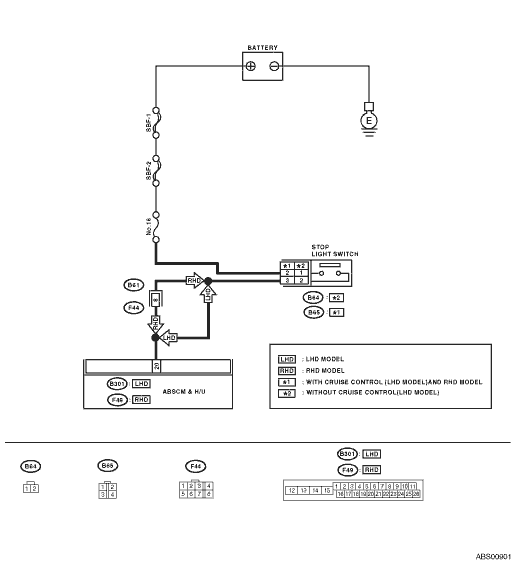
1.CHECK OUTPUT OF STOP LIGHT SWITCH USING SUBARU SELECT MONITOR.
1) Select {Current Data Display & Save} in Subaru Select Monitor.
2) Release the brake pedal.
3) Read the stop light switch signal in Subaru Select Monitor.
|
Is “OFF” displayed on the screen?
|
|
|
2.CHECK OUTPUT OF STOP LIGHT SWITCH USING SUBARU SELECT MONITOR.
1) Depress the brake pedal.
2) Read the stop light switch output in Subaru Select Monitor.
|
Is “ON” displayed on the screen?
|
|
|
3.CHECK IF STOP LIGHTS COME ON.
Depress the brake pedal.
|
Does the stop light illuminate?
|
|
Repair the stop light circuit.
|
4.CHECK OPEN CIRCUIT IN HARNESS.
1) Turn the ignition switch to OFF.
2) Disconnect the ABSCM&H/U connectors.
3) Depress the brake pedal.
4) Measure the voltage between ABSCM&H/U connector and chassis ground.
Connector & terminal
LHD model
(B301) No. 20 (+) — Chassis ground (−):
RHD model
(F49) No. 20 (+) — Chassis ground (−):
|
Is the voltage 10 — 15 V?
|
|
Repair the harness between stop light switch and ABSCM&H/U connector.
|
5.CHECK POOR CONTACT IN CONNECTOR.
|
Is there poor contact in the connector between stop light switch and ABSCM&H/U?
|
|
|
6.CHECK ABSCM&H/U.
1) Connect all connectors.
3) Perform the Inspection Mode.
|
Is the same DTC displayed?
|
Replace the ABSCM only. 
|
|
7.CHECK ANY OTHER DTC ON DISPLAY.
|
Is there any other DTC displayed?
|
Check DTC using “List of Diagnostic Trouble Code (DTC)”.
|
Temporary poor contact occurs.
|