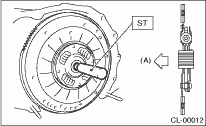
1. Insert the ST into the clutch disc and attach to the flywheel by inserting the ST end into pilot bearing.
NOTE:
When installing the clutch disc, be careful to attach in the correct direction.
| ST 499747100 | CLUTCH DISC GUIDE |
|
(A) |
Flywheel side |
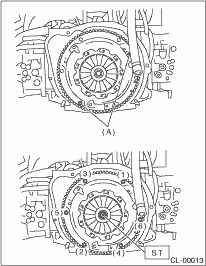
2. Install the clutch cover to the flywheel and tighten the bolts to the specified torque.
NOTE:
• When installing the clutch cover to the flywheel, position the clutch cover so as to make the gap between the unbalance marks ( paint marks) of flywheel and clutch cover 120° or more. (The unbalance marks indicate the directions of residual unbalance.)
• Note the front and rear of the clutch disc when installing.
• Temporarily tighten the bolts by hand. Tighten individual bolts to the specified torque in crisscross order.
Tightening torque:
16 N·m (1.6 kgf-m, 11.8 ft-lb)
|
(A) |
Unbalance mark (paint) |
3. Remove the ST.
| ST 499747100 | CLUTCH DISC GUIDE |
4. Install the transmission assembly. 