VEHICLE DYNAMICS CONTROL (VDC) (DIAGNOSTICS) > Subaru Select Monitor

INSPECTION

1. COMMUNICATION FOR INITIALIZING IMPOSSIBLE

DETECTING CONDITION:

Defective harness connector

TROUBLE SYMPTOM:

Communication is impossible between VDC and Subaru Select Monitor.

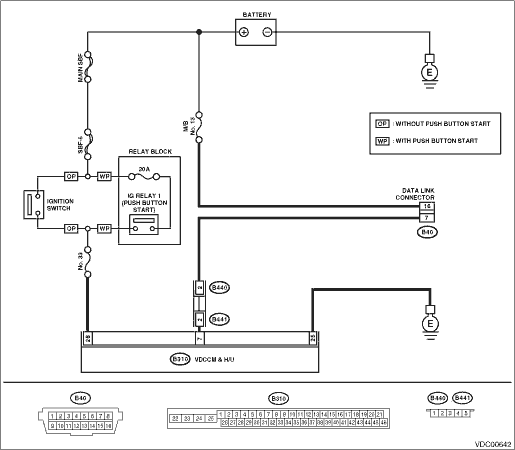
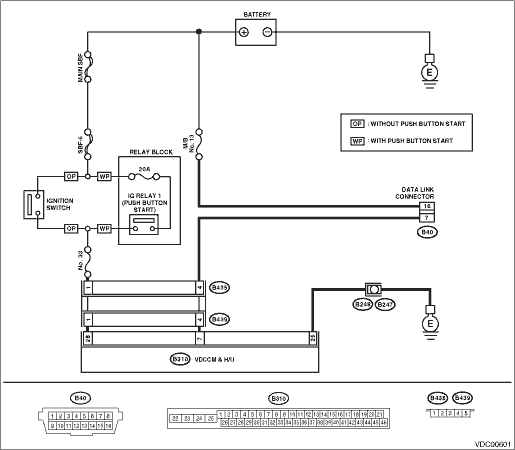
WIRING DIAGRAM:

LHD model

RHD model

STEPCHECKYESNO

1.CHECK IGNITION SWITCH.

Is the ignition switch ON?

Turn the ignition switch to ON, and select VDC mode using Subaru Select Monitor.

2.CHECK BATTERY.

1) Turn the ignition switch to OFF.

2) Measure the battery voltage.

Is the voltage 11 V or more?

Charge or replace the battery.

3.CHECK BATTERY TERMINAL.

Is there poor contact at the battery terminal?

Repair or tighten the battery terminal.

4.CHECK SUBARU SELECT MONITOR COMMUNICATION.

1) Turn the ignition switch to ON.

2) Using the Subaru Select Monitor, check whether communication to other systems can be performed normally.

Is the system name displayed on Subaru Select Monitor?

5.CHECK SUBARU SELECT MONITOR COMMUNICATION.

1) Turn the ignition switch to OFF.

2) Disconnect the VDCCM&H/U connector.

3) Turn the ignition switch to ON.

4) Check whether communication to other systems can be executed normally.

Is the system name displayed on Subaru Select Monitor?

Replace the VDCCM&H/U.

6.CHECK HARNESS CONNECTOR BETWEEN EACH CONTROL MODULE AND DATA LINK CONNECTOR.

1) Turn the ignition switch to OFF.

2) Disconnect the VDCCM&H/U, ECM and TCM.

3) Measure the resistance between data link connector and chassis ground.

Connector & terminal

(B40) No. 7 — Chassis ground:

Is the resistance 1 MΩ or more?

Repair the harness and connector between each control module and data link connector.

7.CHECK OUTPUT SIGNAL FOR VDCCM&H/U.

1) Turn the ignition switch to ON.

2) Measure the voltage between data link connector and chassis ground.

Connector & terminal

(B40) No. 7 (+) — Chassis ground (−):

Is the voltage less than 1 V?

Repair the harness and connector between each control module and data link connector.

8.CHECK HARNESS CONNECTOR BETWEEN VDCCM&H/U AND DATA LINK CONNECTOR.

Measure the resistance between VDCCM&H/U connector and data link connector.

Connector & terminal

(B310) No. 7 — (B40) No. 7:

Is the resistance less than 0.5 Ω?

Repair harness and connector between VDCCM&H/U and data link connector.

9.CHECK INSTALLATION OF VDCCM&H/U CONNECTOR.

Turn the ignition switch to OFF.

Is the VDCCM&H/U connector inserted into VDCCM&H/U until the clamp locks onto it?

Insert VDCCM&H/U connector into VDCCM&H/U.

10.CHECK POWER SUPPLY CIRCUIT.

1) Turn the ignition switch to ON. (engine OFF)

2) Measure the ignition power supply voltage between VDCCM&H/U connector and chassis ground.

Connector & terminal

(B310) No. 28 (+) — Chassis ground (−):

Is the voltage 10 — 15 V?

Repair open circuit in harness between VDCCM&H/U and battery.

11.CHECK HARNESS CONNECTOR BETWEEN VDCCM&H/U AND CHASSIS GROUND.

1) Turn the ignition switch to OFF.

2) Disconnect the connector from the VDCCM&H/U.

3) Measure the resistance of harness between VDCCM&H/U connector and chassis ground.

Connector & terminal

(B310) No. 25 — Chassis ground:

Is the resistance less than 0.5 Ω?

Repair the open circuit of VDCCM&H/U ground harness and poor contact of connector.

12.CHECK POOR CONTACT IN CONNECTOR.

Is there poor contact in control module power supply, ground circuit and data link connector?

Repair the connector.

Replace the VDCCM only.