1. HOW TO USE THE SUBARU SELECT MONITOR
1. Prepare the Subaru Select Monitor kit.
2. Connect the diagnosis cable to the Subaru Select Monitor.
3. Connect the Subaru Select Monitor to the data link connector.
(1) Data link connector is located in the lower portion of the instrument panel (on the driver’s side).
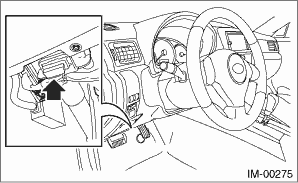
(2) Connect the diagnosis cable to the data link connector.
CAUTION:
Do not connect scan tools other than the Subaru Select Monitor.
4. Turn the ignition switch to ON (engine OFF) and run the Subaru Select Monitor.
5. Using the Subaru Select Monitor, call up DTCs and various data, then record them.
NOTE:
The communication line between ECM and body integrated unit can be checked in “System Operation Check Mode”. This is referred to as “Communication line check”.
1. Connect the Subaru Select Monitor.
2. On the «Main Menu» display screen, select {Each System Check}.
3. On the «System Selection Menu» display, select {Engine Control System}.
4. After engine type information is displayed, select [OK].
5. On the «Engine Diagnosis» display, select {System Operation Check Mode}.
6. On the «System Operation Check Mode» display, select the {Immobilizer System}.
7. Start the communication line check.
8. Is «OK» displayed on screen?
If displayed, go to step 9).
If not, go to step 10).
9. After diagnostic results, it is determined that the circuit is not shorted. Finish the communication line check.
10. If a problem is detected, repair the trouble cause. 