1. CONFIRMATION OF CURRENT SETTING.
1. On «Main Menu» display, select {Each System Check}.
2. On «System Selection Menu» display, select {Integ. unit mode}.
3. On «Integ. unit mode failure diag» display, select {Current Data Display & Save}.
4. Using the scroll key, scroll the display screen up or down until the desired data is shown.
5. Display the following item and record the settings.
Required items for new registration (Except for system not equipped)
|
Item |
Item to confirm |
Remarks | |||
|
Registration number |
1 |
2 |
3 |
4 |
Registered ID type |
|
Off delay time |
OFF |
Long |
Normal |
Short |
Setting for lighting off time |
|
Auto lock time |
60, 50, 40, 30, 20 |
OFF |
(Unit: seconds) | ||
|
Rr defogger op. mode |
Normal |
Continuous |
|||
|
Wiper deicer op. mode |
Normal |
Continuous |
Option setting | ||
|
Security Alarm Setup |
ON |
OFF |
|||
|
Impact Sensor Setup |
ON |
OFF |
Option setting | ||
|
Alarm delay setup |
ON |
OFF |
|||
|
Lockout prevention |
ON |
OFF |
|||
|
Impact sensor |
support |
no support |
Option setting | ||
|
Answer-back buzzer setup |
ON |
OFF |
|||
|
Hazard answer-back setup |
ON |
OFF |
|||
|
Automatic locking setup |
ON |
OFF |
|||
|
Ans.-back Buzzer |
support |
no support |
|||
|
Auto locking |
support |
no support |
|||
|
Initial keyless setting |
Execution |
- |
|||
|
Initial button setting |
Execution |
- |
|||
|
Initial Security setting |
Execution |
- |
|||
|
Select unlock switch |
Selection |
ALL |
|||
|
Passive Alarm |
ON |
OFF |
|||
|
Door open warning (prevention of battery run-out) |
support |
no support |
|||
|
Dome Light Alarm Setting |
ON |
OFF |
|||
|
Belt Warning Switch |
ON |
OFF |
Switch the belt warning lighting and the buzzer sound. | ||
|
A/C ECM setting |
support |
no support |
Model with auto A/C | ||
|
wiperdeicer |
support |
no support |
Option setting | ||
|
Rear fog light setting |
support |
no support |
Option setting | ||
|
Illumination Control On/Off |
support |
no support |
|||
|
Sedan/Wagon Setting |
Sedan |
Wagon |
|||
|
MT/AT Setting |
AT |
MT |
|||
|
6MT Setting |
6MT |
Other than 6MT |
|||
|
Destination Setting |
|||||
|
Double Lock On/Off Setting |
support |
no support |
|||
|
Factory or Market setting |
Factory |
Market |
Do not change to factory mode. | ||
|
Security setup |
support |
no support |
|||
2. REGISTRATION BODY INTEGRATED UNIT (FUNCTION SETTING)
CAUTION:
Body integrated unit is core of LAN system, and also can select the function of all vehicle system control. It is possible to control the original functions of vehicle when registrations of body integrated unit and function setting are corresponded to vehicle equipment.
If registrations and function setting are different from vehicle equipment, vehicle system does not operate normally and diagnosis cannot be performed correctly. Pay attention to following item.
• Be sure to correspond registrations and function settings to vehicle equipment.
• Do not change the settings of vehicle improperly.
• Confirm key illumination does not blink or “Factory or Market setting” of body integrated unit registrations is “Market”. If “Factory or Market setting” is set to “Factory,” key illumination blinks when ignition key is turned ON, to notify that the settings are unconfirmed. (except for model with keyless access)
• Key illumination does not blink with ignition switch turned to ON and go off with door closed. (except for model with keyless access)
• Be sure to register immobilizer if body integrated unit is replaced with a new part. (model with immobilizer)
• Make a registration of immobilizer when the parts related to immobilizer have been replaced. Refer to the “PC application help for Subaru Select Monitor”.
1. On «Main Menu» display, select {Each System Check}.
2. On «System Selection Menu» display, select {Integ. unit mode}.
3. Click the [OK] button after the control module name {Integ. Unit} is displayed.
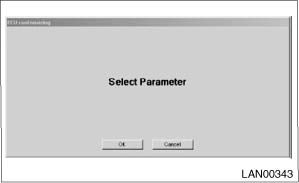
4. On «Integ. unit mode failure diag» display, select {ECM customizing}.
NOTE:
For the vehicle requiring the destination setting, if the destination setting is not finished, display can not be shifted into customizing screen. 
5. Change the setting with UP/DOWN key.
• List of body integrated unit registration item
NOTE:
Setting is different depending on the grade of vehicle.
|
Data |
Initial setting |
Registration |
Remarks |
|
A/C ECM setting |
OFF |
ON |
Set to “ON” in case of model with auto A/C. Set to “OFF” in case of model without auto A/C. |
|
OFF | |||
|
wiperdeicer (Manufacturer option) |
OFF |
ON |
Be sure to set exactly according to vehicle equipment. ON signal does not output with operation of wiper deicer switch if wiper deicer is set to “OFF” in model with a wiper deicer. |
|
OFF | |||
|
Rear fog light setting (Manufacturer option) |
OFF |
ON |
Be sure to set exactly according to vehicle equipment. (Always set to “OFF” for vehicles not equipped with the rear fog light.) |
|
OFF | |||
|
Illumination Control On/Off |
ON |
ON |
Be sure to set exactly according to vehicle equipment. Lighting adjustment is not possible when “OFF” is set for the model with illumination volume control. |
|
OFF | |||
|
Sedan/Wagon Setting |
Wagon |
Sedan |
Be sure to set exactly according to vehicle equipment. This relates to door lock control. |
|
Wagon | |||
|
MT/AT Setting |
AT |
AT |
Be sure to set exactly according to vehicle equipment. This relates to key interlock control, shift lock control. |
|
MT | |||
|
6MT Setting |
Other than 6MT |
6MT |
Set “6MT” for 6MT model, and set “Other than 6MT” for AT/5MT model. |
|
Other than 6MT | |||
|
Double Lock On/Off Setting |
OFF |
ON |
Displayed only for KA model. This relates to door lock control. |
|
OFF | |||
|
Factory or Market setting (Reset of body integrated unit) |
Factory |
Factory (Reset) |
If Factory or Market setting is set to “Factory”, registrations of items above is changed to “OFF”. Be sure to set to “Market”. |
|
Market (Confirmed) | |||
|
Security setup |
OFF |
ON |
Set to “ON” for EK model. |
|
OFF |
CAUTION:
• To perform normal operation of vehicle and diagnosis, the above settings must match the actual vehicle equipment.
• When body integrated unit is a new part or “Factory” mode, key illumination blinks to show equipment settings have not been completed. Check the detailed procedures of function setting. (For model with keyless access, check with Subaru Select Monitor because the model has no key illumination feature.)
• Be sure not to change Factory or Market setting except when installing a new body integrated unit.
NOTE:
“Factory” mode:
• Body integrated unit has not been set yet. It can be recognized by key illumination blinking with ignition switch turned to ON. (except for model with keyless access)
• All replacement body integrated units are set to “Factory” mode. When replacing a body integrated unit, be sure to perform the registration operation.
“Market” mode:
• Each settings have been set. It can be recognized by key ring illumination coming on in concocting with room light and going off with ignition switch turned to ON.
6. Perform the Factory or Market setting. On the «ECM customizing” display screen of Subaru Select Monitor, select the {Factory or Market setting}.
7. Change the mode from Factory to Market.
8. Turn the ignition switch to OFF to settle Market mode, and turn the ignition switch to ON.
9. Change the Subaru Select Monitor system selection to «Immobilizer» to register the immobilizer key. (model with immobilizer)
10. Perform the operation according to the “PC application help for Subaru Select Monitor”.
11. When key registration is completed, “Do you want to register remote engine start?” is displayed. Perform registration only for equipped models. (Displayed only for model without keyless access)
12. Perform the User Customizing.
NOTE:
For detailed operation procedures, refer to “PC application help for Subaru Select Monitor”.
NOTE:
For the vehicle requiring the destination setting, if the destination setting is not finished, display can not be shifted into customizing screen.
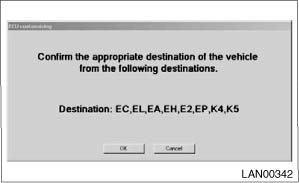
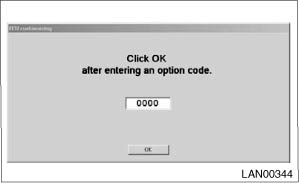
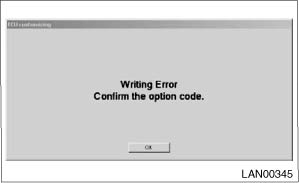
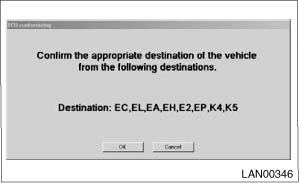
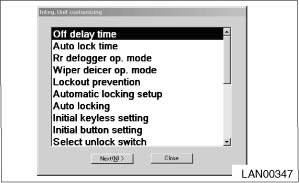
NOTE:
How to confirm when the destination code is not known.
• RHD model
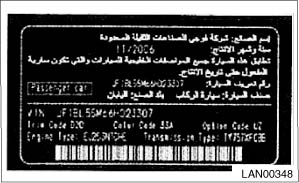
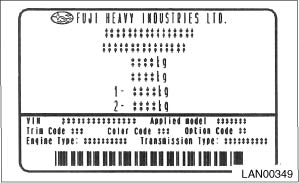
It can be confirmed by the 5th of the applied model number (7-digit type) described in the model number label.
|
Applied model number (7-digit type) |
5th character |
Destination code |
|
*****K** |
K |
EK00 |
|
*****4** |
4 or 5 |
JP00 |
|
*****5** |
• LHD model
Confirm if there is Arabic description in the model number label.
|
Model number label |
Arabic description |
Destination code |
|
|
Yes |
KS00 |
|
|
None |
EC00 |