NOTE:
In order to check the body integrated unit function, inspect the body integrated unit and actuator using Subaru Select Monitor without operating switches.
1. On «Main Menu» display, select {Each System Check}.
2. On «System Selection Menu» display, select {Integ. unit mode}.
3. On «Integ. unit mode failure diag» display, select {Function check}.
4. Select the item to be operated on the «Function check» display screen with “UP/Down key” and press the [Next] button.
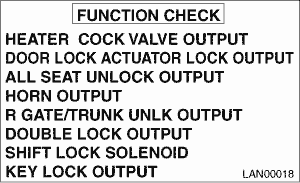
5. Pressing [Next] starts, [End] cancels the operation and [OK] returns to the System Operation Check Mode display screen.
NOTE:
• If not equipped (based on area or condition), process will not go on.
• Because the model with keyless access is not equipped with key lock solenoid, the operation is disabled.
• For detailed operation procedures, refer to “PC application help for Subaru Select Monitor”.