1. Prepare the Subaru Select Monitor kit. 
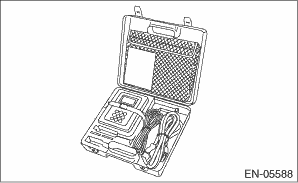
2. Prepare the personal computer which has been installed the Subaru Select Monitor.
3. Connect the USB cable between SDI (Subaru Diagnosis Interface) and USB port on the personal computer (dedicated port for the Subaru Select Monitor).
NOTE:
The dedicated port for the Subaru Select Monitor means the USB port which was used to install the Subaru Select Monitor.
4. Connect the diagnosis cable to the SDI.
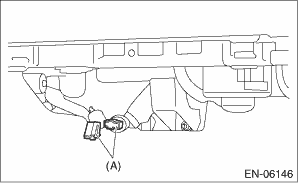
5. Connect the delivery (test) mode connector (A) located under the glove box.
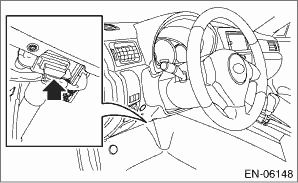
6. Connect the SDI to data link connector located in the lower portion of the instrument panel (on the driver’s side).
CAUTION:
Do not connect any scan tools except Subaru Select Monitor and general scan tool.
7. Start up the PC.
8. Turn the ignition switch to ON (engine OFF), and run the “PC application for Subaru Select Monitor”.
9. On the «Main Menu» display screen, select the {Each System Check}.
10. On the «System Selection Menu» display screen, select the {Engine Control System}.
11. Click the [OK] button after the information of engine type has been displayed.
12. On the «Engine Diagnosis» display screen, select the {System Operation Check Mode}.
13. On the «System Operation Check Mode» display screen, select the {Actuator ON/OFF Dr.}.
14. Select the desired compulsory actuator on the «Actuator ON/OFF Operation» display screen and click the [Next] button.
15. Clicking the [End] button completes the compulsory valve operation check mode. The display will then return to the «Actuator ON/OFF Operation» screen.
• A list of the support data is shown in the following table.
|
Description |
Display |
|
Compulsory fuel pump relay operation check |
Fuel Pump Relay |
|
Compulsory purge control solenoid valve operation check |
CPC Solenoid Valve |
|
Compulsory radiator fan relay operation check |
Radiator Fan Relay |
|
Compulsory air conditioning relay operation check |
A/C Compressor Relay |
NOTE:
• The following parts will be displayed but not functional.
|
Display |
|
EGR Solenoid Valve |
|
ASV Solenoid Valve |
|
PCV Solenoid Valve |
|
Vent. Solenoid Valve |
|
FICD Solenoid |
|
Pressure Switching Sol.1 |
|
Pressure Switching Sol.2 |
|
AAI Solenoid Valve |
|
Tank Sensor Cntl Valve |
|
Turbocharger Wastegate Solenoid |
|
EXH. Bypass Control Permit Flag |
|
Secondary Air Combi Valve 1 |
• For detailed operation procedure, refer to the “PC application help for Subaru Select Monitor”.