1. Prepare the Subaru Select Monitor kit. 
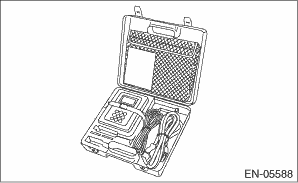
2. Prepare PC with Subaru Select Monitor installed.
3. Connect the USB cable to SDI (Subaru Diagnosis Interface) and USB port on the personal computer (dedicated port for the Subaru Select Monitor).
NOTE:
The dedicated port for the Subaru Select Monitor means the USB port which was used to install the Subaru Select Monitor.
4. Connect the diagnosis cable to SDI.
5. Connect SDI to data link connector located in the lower portion of the instrument panel (on the driver’s side).
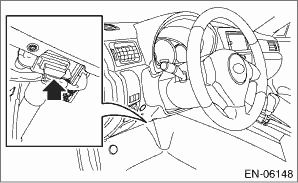
CAUTION:
Do not connect any scan tools except Subaru Select Monitor or general scan tool.
6. Start the PC.
7. Turn the ignition switch to ON (engine OFF) and run the “PC application for Subaru Select Monitor”.
8. On «Main Menu» display, select {Each System Check}.
9. On «System Selection Menu» display, select {Engine Control System}.
10. Click the [OK] button after the information of engine type has been displayed.
11. On «Engine Diagnosis» display, select {System Operation Check Mode}.
12. The following items are displayed on the display.
|
Display |
|
Actuator ON/OFF Operation |
|
Immobilizer System |
|
Idle Speed Control |
|
Injector Control |
|
EGR Valve Control |
|
Sub Fuel Pump Control |
|
Boost Valve Control |
|
High Pressure Fuel Inspection |
CAUTION:
After executing the system operation check mode, execute the Clear Memory Mode.
1. On «System Operation Check Mode» display, select {Idle Speed Control}.
2. On «Start the Engine» display, start the engine and click the [OK] button.
3. In the «Idle Speed Control» display, click the [ ] button or the [
 ] button to change the setting values, then click the [OK] button.
Setting is possible in a range between 500 rpm — 2,000 rpm, in increments of 50 rpm. However, the engine speed that can actually be controlled will vary depending on the vehicle.
4. Click the [Cancel] button to stop the idle speed control.
5. Click the [ Exit] button to end the idle speed control. The screen will return to the «System Operation Check Mode» screen.
2. INJECTOR CONTROL (INJECTION STOP MODE)
CAUTION:
After executing the system operation check mode, execute the Clear Memory Mode.
1. On «System Operation Check Mode» display, select {Injector Control}.
2. On «Injector Control» display, select {Injection Stop Mode}.
3. On «Injection Stop Mode» display, select the fuel injector to be stopped.
4. On «Start the Engine» display, start the engine and click the [OK] button.
5. On «Fuel Injector #» display, click the [Execution] button and execute the injection stop mode.
6. Click the [Cancel] button to stop the injection stop mode.
7. [Click the [ Exit] button to return the «Injection Stop Mode» display screen.
8. On «Injection Stop Mode» display, click the [Return] button to end the «Injection Stop Mode». The screen will return to the «Injector Control» screen.
CAUTION:
After executing the system operation check mode, execute the Clear Memory Mode.
1. On «System Operation Check Mode» display, select {EGR Valve Control}.
2. On «Turn Ignition Switch ON with Engine OFF» display, turn the ignition switch to ON and click the [OK] button.
3. In the «EGR Valve Control» display, click the [] button or the [] button to change the setting values, then click the [OK] button.
Setting is possible in increments of 1 deg. However, the range that can actually be controlled will vary depending on the vehicle.
NOTE:
The maximum value for EGR valve opening angle is 70 deg. If the target EGR valve opening angle is set to 71 — 100 deg, EGR valve opening angle is fixed to 70 deg.
4. Click the [Cancel] button to stop the EGR valve control.
5. Click the [ Exit] button to end the EGR valve control. The screen will return to the «System Operation Check Mode» screen.
4. SUB FUEL PUMP CONTROL (ON/OFF DRIVE)
CAUTION:
After executing the system operation check mode, execute the Clear Memory Mode.
1. On «System Operation Check Mode» display, select {Sub Fuel Pump Control}.
2. On «Sub Fuel Pump Control» display, select {ON/OFF Dr.}.
3. On «Turn Ignition Switch ON with Engine OFF» display, turn the ignition switch to ON and click the [OK] button.
4. On «ON/OFF Dr.» display, click the [Execution] button and execute the ON/OFF drive.
5. Click the [Cancel] button to stop the ON/OFF drive.
6. Click the [ Exit] button to end the ON/OFF drive. The screen will return to the «Sub Fuel Pump Control» screen.
CAUTION:
After executing the system operation check mode, execute the Clear Memory Mode.
1. On «System Operation Check Mode» display, select {Boost Valve Control}.
2. On «Start the Engine» display, start the engine and click the [OK] button.
3. In the «Boost Valve Control» display screen, click the [] button or the [] button to change the setting values, then click the [OK] button.
Setting is possible in a range between 0 — 100%, in increments of 10%.
4. Click the [Cancel] button to stop the boost valve control.
5. [Click the [ Exit] button to end the boost valve control. The screen will return to the «System Operation Check Mode» screen.
6. HIGH PRESSURE FUEL INSPECTION
CAUTION:
After executing the system operation check mode, execute the Clear Memory Mode.
1. On «System Operation Check Mode» display, select {High Pressure Fuel Inspection}.
2. On «Start the Engine» display, start the engine and click the [OK] button.
3. Click [OK] button in the «Beware of RPM rise when process underway» display screen.
4. On «High Pressure Fuel Inspection» display screen, click the [Execution] button and execute the high pressure fuel inspection.
5. Click the [Cancel] button to stop the high pressure fuel inspection.
6. [Click the [ Exit] button to end the high pressure fuel inspection. The screen will return to the «System Operation Check Mode» screen.