1. Prepare the Subaru Select Monitor kit. 
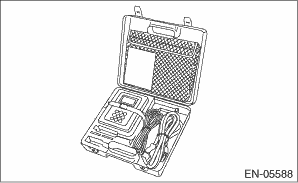
2. Prepare PC with Subaru Select Monitor installed.
3. Connect the USB cable to SDI (Subaru Diagnosis Interface) and USB port on the personal computer (dedicated port for the Subaru Select Monitor).
NOTE:
The dedicated port for the Subaru Select Monitor means the USB port which was used to install the Subaru Select Monitor.
4. Connect the diagnosis cable to SDI.
5. Connect SDI to data link connector located in the lower portion of the instrument panel (on the driver’s side).
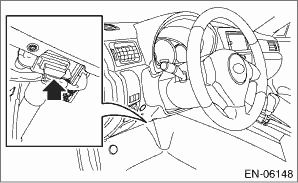
CAUTION:
Do not connect any scan tools except Subaru Select Monitor or general scan tool.
6. Start the PC.
7. Turn the ignition switch to ON (engine OFF) and run the “PC application for Subaru Select Monitor”.
8. On «Main Menu» display, select {Each System Check}.
9. On «System Selection Menu» display, select {Engine Control System}.
10. Click the [OK] button after the information of engine type has been displayed.
11. On «Engine Diagnosis» display, select {Maintenance mode}.
12. The following items are displayed on the display.
|
Display |
|
DPF maintenance |
|
Oil maintenance mode |
|
Maintenance at the time of ECM replacement |
1. DPF MAINTENANCE (DPF CHANGE)
1. On «Maintenance mode» display, select {DPF maintenance}.
2. On «DPF maintenance» display, select {DPF change}.
3. On «Has the DPF been replaced?» display, click the [Yes] button.
4. On «The ash accumulation rate and soot accumulation rate are reset.» display, click [OK] button.
5. On «Use the present data display/save mode to confirm that ash accumulation rate and soot accumulation rate have been reset.» display, click [OK] button to end the DPF change mode. The screen will return to «DPF maintenance» screen.
6. Make sure «Cumulative ash ratio» and «SOOT accumulation ratio» are reset using Subaru Select Monitor.
NOTE:
For detailed operation procedures, refer to “READ CURRENT DATA FOR ENGINE” and “PC application help for Subaru Select Monitor”.
2. DPF MAINTENANCE (DPF REGENERATION)
WARNING:
• When performing DPF regeneration mode, always ventilate the workplace and be careful not to take in exhaust gas. Exhaust gas may adversely affect human body.
• When performing DPF regeneration mode, make sure there is no person or inflammable material around the vehicle. Hot exhaust pipe and gas may cause a burn or fire.
CAUTION:
• When performing DPF regeneration mode, do not operate the accelerator pedal.
• After executing the maintenance mode, execute the Clear Memory Mode.
NOTE:
When performing DPF regeneration mode, oil dilution ratio rises up due to fuel mixed in engine oil. This is not malfunction.
1. Open the front hood.
2. Start the engine.
3. On «Maintenance mode» display, select {DPF maintenance}.
4. On «DPF maintenance» display, select {DPF regeneration}.
NOTE:
• If {DPF regeneration} is selected when DPF warning light does not blink, «DPF regeneration is not necessary due soot accumulation rate is low. Perform compulsory regeneration?» is displayed. When performing force regeneration, click [OK] and go on to step 6).
• If {DPF regeneration} is selected when DPF warning light blinks, «DPF regeneration cannot be performed due soot accumulation rate is high.» may be displayed. In this case, stop DPF regeneration and read the DTC using Subaru Select Monitor or general scan tool to check the corresponding DTC.
5. On «Perform DPF regeneration?» display, click the [OK] button.
6. On «Apply the parking brake.» display, pull up the parking brake and click the [OK] button.
7. On «Please note that the engine speed changes during execution. Stay with the vehicle until regeneration completion.» display, click the [OK] button.
NOTE:
• When performing DPF regeneration mode while engine coolant temperature is low, the engine speed may temporarily change widely. This is not malfunction.
• When DPF temperature is low, «The DPF temperature is raised. Wait until the DPF temperature becomes 550°C to 800°C.» is displayed, so wait until DPF temperature rises.
8. «During DPF regeneration» is displayed, and “SOOT accumulation ratio” in the screen starts to go down. Wait until the engine speed returns to idling and «DPF regeneration has been completed» screen is displayed.
CAUTION:
• DPF regeneration mode can be stopped by clicking [Cancel] button on «During DPF regeneration». However do not cancel except in an emergency. Otherwise catalytic converter & DPF may be damaged.
• When DPF regeneration mode is canceled, turn the ignition switch to OFF and wait for at least 15 seconds, and then perform DPF regeneration mode again to make sure the mode is complete.
9. On «DPF regeneration has been completed.» display, click the [OK] button to end DPF regeneration mode. The screen will return to «DPF maintenance» screen.
NOTE:
• For detailed operation procedures, refer to “PC application help for Subaru Select Monitor”.
• When DPF regeneration fails to end properly, perform again according to the displayed items.
1. On «Maintenance mode» display, select {Oil maintenance mode}.
2. On «Oil maintenance mode» display, select {Engine oil change}.
3. On «Has the engine oil been changed? » display, click the [Yes] button.
4. On «The oil dilution ratio is reset.» display, click the [OK] button.
5. On «The oil dilution ratio has been reset to normal.» display, click the [OK] button to end the engine oil change mode. The screen will return to the «Oil maintenance mode» screen.
6. Make sure “Oil dilution ratio” is reset using Subaru Select Monitor.
NOTE:
• For detailed operation procedures, refer to “PC application help for Subaru Select Monitor”.
• When oil dilution ratio fails to be reset, perform again from step 2).
4. MAINTENANCE AT THE TIME OF ECM REPLACEMENT (READING OF DPF/ENGINE OIL-RELATED LEARNING VALUES: ECM TO SSM)
1. On «Maintenance mode» display, select {Maintenance at the time of ECM replacement}.
2. On «Maintenance at the time of ECM replacement» display, select {Reading of DPF/engine oil-related learning values: ECM to SSM}.
3. On «Start reading of DPF/engine oil-related learning values?» display, click the [OK] button.
4. On «Save data?» display screen, click the [OK] button.
5. On «When saving, enter the VIN No. into the Comment column, so that there is no mistake at the time of writing.» display, click the [OK] button.
6. On «Save data as new name?» display screen, save the dpf file in the suitable location.
NOTE:
Enter the identification information such as VIN No. into the Comment column so as not to select a wrong file at the time of writing the learning values.
7. On «Turn off the ignition switch.» display, click the [OK] button to end the learning value reading. The screen will return to «Maintenance at the time of ECM replacement» screen.
5. MAINTENANCE AT THE TIME OF ECM REPLACEMENT (WRITING OF DPF/ENGINE OIL-RELATED LEARNING VALUES: SSM TO ECM)
1. On «Maintenance mode» display, select {Maintenance at the time of ECM replacement}.
2. On «Maintenance at the time of ECM replacement» display, select {Writing of DPF/engine oil-related learning values: SSM to ECM}.
3. On «Start DPF/engine oil-related learning writing?» display, click the [OK] button.
4. On «Confirm that the input information in the Comment column refers to the object vehicle.» display, click the [OK] button.
5. On «Open file.» display screen, open the suitable dpf file.
NOTE:
Make sure that identification information in the Comment column refers to the object vehicle so as not to select a wrong file.
6. On «Write?» display, click the [OK] button.
7. On «Writing has been completed.» display screen, click the [OK] button to end the learning value writing. The screen will return to «Maintenance at the time of ECM replacement» screen.