NOTE:
Do not disassemble propeller shaft. Check the following and replace if necessary.
• Dents or cracks on the tube surface
• Splines for deformation or abnormal wear
• Unsmooth joint operation or abnormal noise
• Center bearing for free play, noise or non-smooth operation.
• Oil seals for abnormal wear or damage
• Damaged center bearing
Check the following points with propeller shaft installed in vehicle.
1. Remove the center exhaust pipe.
2. Remove the heat shield cover.
3. Check for any looseness of the yoke flange mounting bolts which connect to the rear differential and center bearing bracket mounting bolts.
1. Remove the center exhaust pipe.
2. Remove the rear exhaust pipe and muffler.
3. Remove the heat shield cover.
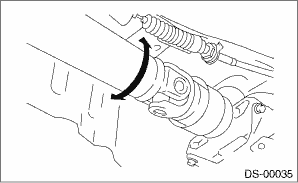
4. Turn the propeller shaft by hand to see if abnormal free play exists at splines. Also move yokes to see if abnormal free play exists at spiders and bearings.
1. Remove the center exhaust pipe.
2. Remove the rear exhaust pipe and muffler.
3. Remove the heat shield cover.
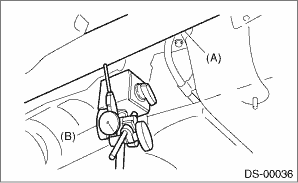
4. Set the dial gauge with its indicator stem at the center of the propeller shaft tube.
5. Turn the propeller shaft slowly by hands to check for runout of the propeller shaft.
Runout:
Service limit 0.6 mm (0.024 in)
|
(A) |
Propeller shaft |
|
(B) |
Dial gauge |
1. Remove the front and center exhaust pipes.
2. Remove the rear exhaust pipe and muffler.
3. Remove the heat shield cover.
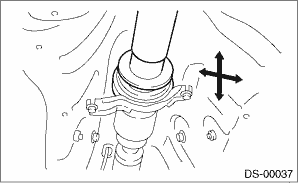
4. Move the propeller shaft near the center bearing up, down, left, right by hand, to check for any abnormal free play of the bearings.