1. Return the parking brake lever fully.
2. Loosen the adjusting nut, and make the cable free.
3. Remove the adjusting hole cover from the disc rotor.
4. Turn the adjusting screw using a flat tip screwdriver until the brake shoe is in close contact with the disc rotor.
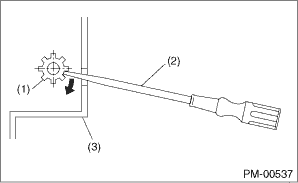
|
(1) |
Adjusting screw |
|
(2) |
Flat tip screwdriver |
|
(3) |
Disc rotor |
5. Turn back the adjusting screw 5 notches to opposite direction of arrow.
CAUTION:
• Check there is no brake drag.
• If the amount that the adjusting screw is turned back is little, securely turn back 5 notches to avoid dragging.
6. Install the adjusting hole cover to the disc rotor.
7. Adjust the parking lever stroke. 
1. Adjust the shoe clearance before adjusting lever stroke.
2. Remove the parking lever cover.
3. Pull the parking brake lever hard 3 to 5 times.
4. Turn the adjusting nut until the lever stroke is at the specified value.
Lever stroke:
7 to 8 notches when pulled with a force of 200 N (20.4 kgf, 45 lbf)
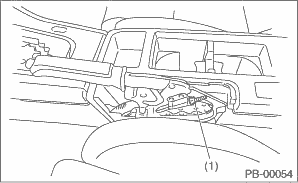
|
(1) |
Adjusting nut (Self-locking nut) |
5. Check there is no brake drag.
6. Install the parking lever cover.